The Climb, step 02
Getting Google to Recognise Your Brand
Google shows "Did you mean?" above your result and sends people to competitors. Here's how we told Google exactly who we are.
Why this matters
A customer types your name into Google and sees "Did you mean: [some other brand]?" at the top. That tiny line plants doubt and sends people elsewhere. Until Google is confident your brand is real, you're leaking customers, even when you rank #1.
Where we are today
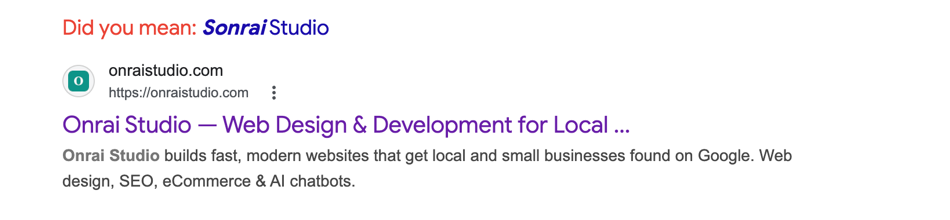
This is what Google currently shows when someone searches "Onrai Studio". Good news: we're the #1 result. Bad news: Google still thinks the name might be a typo for "Sonrai Studio" and says so at the top of the page. That's the gap we're closing in this step.
The steps we took
- 1
Spell your brand name the same way everywhere
Check that your business name is spelled identically everywhere: header, footer, page titles, about page, contact page. One lowercase "s" in "Onrai studio" can confuse Google.
- 2
Add a "business card" to your site that Google can read
Add a hidden piece of code to your homepage that tells Google exactly what your business is, where it's based, and how to contact you. It's called structured data: a digital business card with your name, logo, location, email, and founder.
- 3
Tell Google where you operate and who runs the show
List your city, state, country, and the founder's name in the business card. This gives Google a human and a location to attach your brand to, which helps when it decides if you're a real business or a random word.
- 4
Check your work with Google's free testing tool
Use Google's free Rich Results Test: paste your URL, wait a few seconds, and you'll see green ticks or a list of fixes. Quick way to confirm your business card is working.
What changes after this
Over the coming weeks, the "Did you mean: Sonrai Studio" suggestion should fade and disappear. Google will treat your brand as a real entity. That's a prerequisite for knowledge panels, map listings, and being cited by AI models.


