The Climb, step 12
The Reward: Sitelinks Under Your Google Result
Every earlier step builds toward this. Search a big brand and you get a stack of links: Home, Services, Contact, Reviews. That stack is called sitelinks, and Google hands it out when it decides you've earned it.
Why this is the reward
A normal Google result is one blue link, one URL, two lines of text. The reward version is a small menu of your whole business: six clickable links, sometimes with their own descriptions. It takes up two or three times more space, pushes competitors below the fold, and signals that Google trusts you. You can't pay for it. Google gives it to the sites it has decided are the real thing.
There's no switch: you earn it
No setting, code or schema markup turns sitelinks on. Google decides on its own, and it only decides yes when everything you've done in the earlier chapters adds up: a recognised brand, a trusted profile, a clean site it can read. The checklist below sums up the homework Google wants to see finished before it gives you the reward.
What Google wants to see before it rewards you
- 1
Own your brand search
Google only hands the reward to sites that are already the unquestioned #1 result for their own name. If Google still isn't sure your brand is yours, go back to Step 02 and finish that fight first.
- 2
Keep your main navigation small and stable
Your top nav is the strongest hint Google has about which pages deserve the reward. Aim for 5–7 items: Home, Services, Portfolio, About, Contact. Don't reshuffle them every month. The more stable and obvious your nav, the more confident Google is about which links to pick when it's ready to give you sitelinks.
- 3
Use descriptive link text everywhere
"Click here" tells Google nothing. "Rolex servicing in Melbourne" tells Google exactly what that page is about. Every internal link should describe its destination in plain words, because those descriptions are the candidate wording Google will use when it eventually builds your sitelinks.
- 4
Use logical, readable URLs
/services/web-design beats /page?id=42. URLs that read like a sentence help Google group your pages into a clear structure. Messy URLs give Google a reason to withhold the reward. Fix them once now and set up redirects from the old ones. Your hosting provider has a guide for this.
- 5
Submit your sitemap and keep page titles unique
In Google Search Console, submit your sitemap.xml so Google has the full map of your site. Then make sure every page has its own unique <title> tag. Duplicate titles confuse Google, and a confused Google won't hand out the reward.
If Google rewards you with the wrong links
Sometimes Google finally hands over the reward but picks something weird: an old privacy policy, a stray tag page. You can't pick sitelinks, and Search Console's old demotion tool was retired in 2016. Instead, make the right pages easy to pick: put them in your main navigation, link to them from your homepage, and give each a clear, distinct title. If a page shouldn't be in search at all, add a noindex tag. Google reshuffles sitelinks on its own as it recrawls, usually within a few weeks.
What the reward looks like
Your brand result looks like a small menu of your business. Click-through rate climbs because there are more entry points. Competitors below you get visually buried. The result looks official, which helps win a stranger's first click. This is the payoff for every earlier step on The Climb.
The reward, in the wild
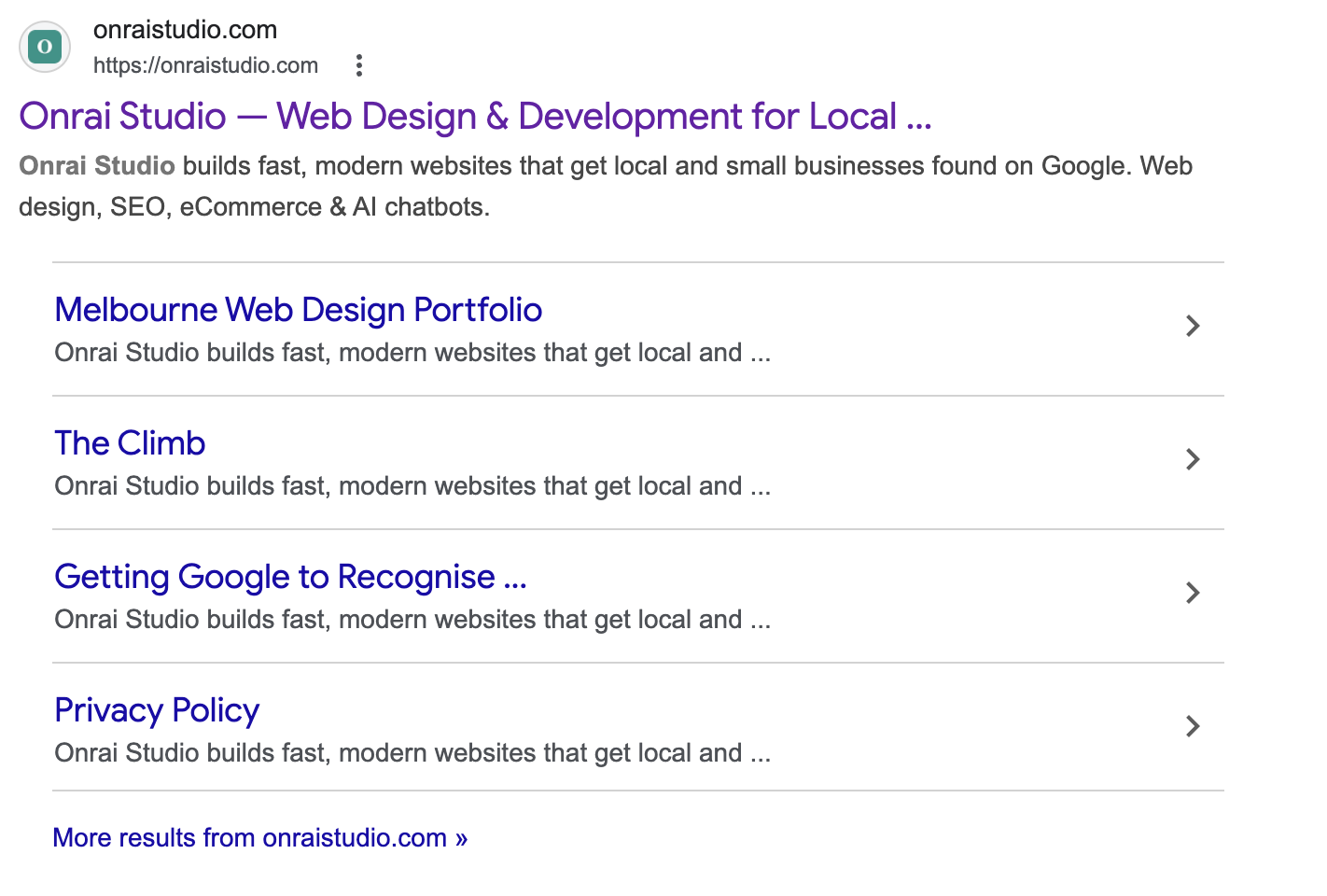
Here is what it looks like when Google decides you've earned it. Search "Onrai Studio" today and you'll see our homepage with a stack of sub-links underneath (Melbourne Web Design Portfolio, The Climb, Getting Google to Recognise, even our Privacy Policy), laid out like a mini table of contents. That's Google saying: "I trust this site. Here's a menu of the pages most worth your click." (That Privacy Policy link is the kind of weird pick the previous section warned about, and a demotion candidate.)